PM YASASVI Scholarship 2026-27 Apply Online: Eligibility, Documents and Step-by-Step Process
Introduction
If you are looking to apply online for the PM YASASVI Scholarship 2026-27, the entire process happens on the National Scholarship Portal (NSP) at scholarships.gov.in. You register once with an OTR (One Time Registration), log in, choose the PM YASASVI scheme that matches your class, fill in the form, upload your documents and press Final Submit. Nothing is done on paper, and no agent or middleman is needed.
The scholarship is meant for students from OBC, EBC and DNT backgrounds whose family income falls within the prescribed limit. It is one of the larger central schemes, and for many families it makes the difference between continuing in a good school or college and dropping out.
The catch is timing. Last dates for 2026-27 have been reported differently across websites and institutions, so you should not rely on a single date from a blog. Always cross-check the notice board on NSP for the date that applies to your level of study.
In this guide you will find:
- Who is eligible and what benefits you can expect
- The documents to keep ready before you open the portal
- A clear, step-by-step process for applying online
- What happens after submission, including verification and payment
- The most common mistakes that lead to rejection, and how to fix them
- Answers to the questions students and parents ask most often
Read it once before you begin. It can save you from a rejected form.
What Is the PM YASASVI Scholarship and Who Can Apply Online?
What the scheme actually is
PM YASASVI stands for Prime Minister Young Achievers Scholarship Award Scheme for Vibrant India. It is a central government scheme run by the Ministry of Social Justice and Empowerment. Its purpose is to help students from OBC, EBC and DNT communities continue their education without money becoming the obstacle.
Many students search for it as “PM Yashasvi”, “PM Yasasvi Yojana” or “PM Yashasvi Scholarship”. All of these refer to the same scheme.
The scheme covers different stages of education. Depending on your class and institution, you may fall under a pre-matric, post-matric or top-class education component. That is why picking the right scheme on NSP matters so much.
Who can apply
Eligibility can vary slightly by component, but these are the general conditions:
- The student belongs to the OBC, EBC or DNT category
- Family income is within the limit set for the scheme, which is ₹2.5 lakh per year for most components
- The student is studying in a recognised school or institution covered by the scheme
- The student has a bank account linked with Aadhaar, because money is paid through Direct Benefit Transfer (DBT)
- The student is an Indian citizen, with a valid caste and income certificate
What benefits to expect
The amount depends on your class and which component you apply under. Reported figures for school-level support are up to ₹75,000 a year for Classes 9 and 10 and up to ₹1.25 lakh a year for Classes 11 and 12. Treat these as indicative and check the official guidelines for the exact amount for your category.
The money is intended to cover costs such as tuition, books and other educational expenses, rather than being a general cash grant.
Is there an entrance exam this year?
In earlier years, the YASASVI Entrance Test (YET) was linked to this scheme. For the 2026-27 cycle, reports say the entrance test is not being held and students apply directly through NSP. Since this has changed before, check the official notice for your component.
Quick Summary
| Detail | Information |
|---|---|
| Scheme name | PM YASASVI Scholarship 2026-27 |
| Run by | Ministry of Social Justice & Empowerment, Government of India |
| For | OBC, EBC and DNT students |
| Application mode | Online only, through NSP (scholarships.gov.in) |
| Income limit | Up to ₹2.5 lakh per year (for most components) |
| Indicative benefit | Up to ₹75,000 (Class 9-10) and ₹1.25 lakh (Class 11-12) per year |
| Payment method | Direct Benefit Transfer to Aadhaar-linked bank account |
| Registration | New OTR for first-time users |
| Application opened | June 1, 2026 |
| Reported last dates | Aug 31 (school), Oct 31 (college); confirm on NSP |
| Helpline | 0120-6619540, helpdesk@nsp.gov.in |
Documents Required for PM YASASVI Online Application
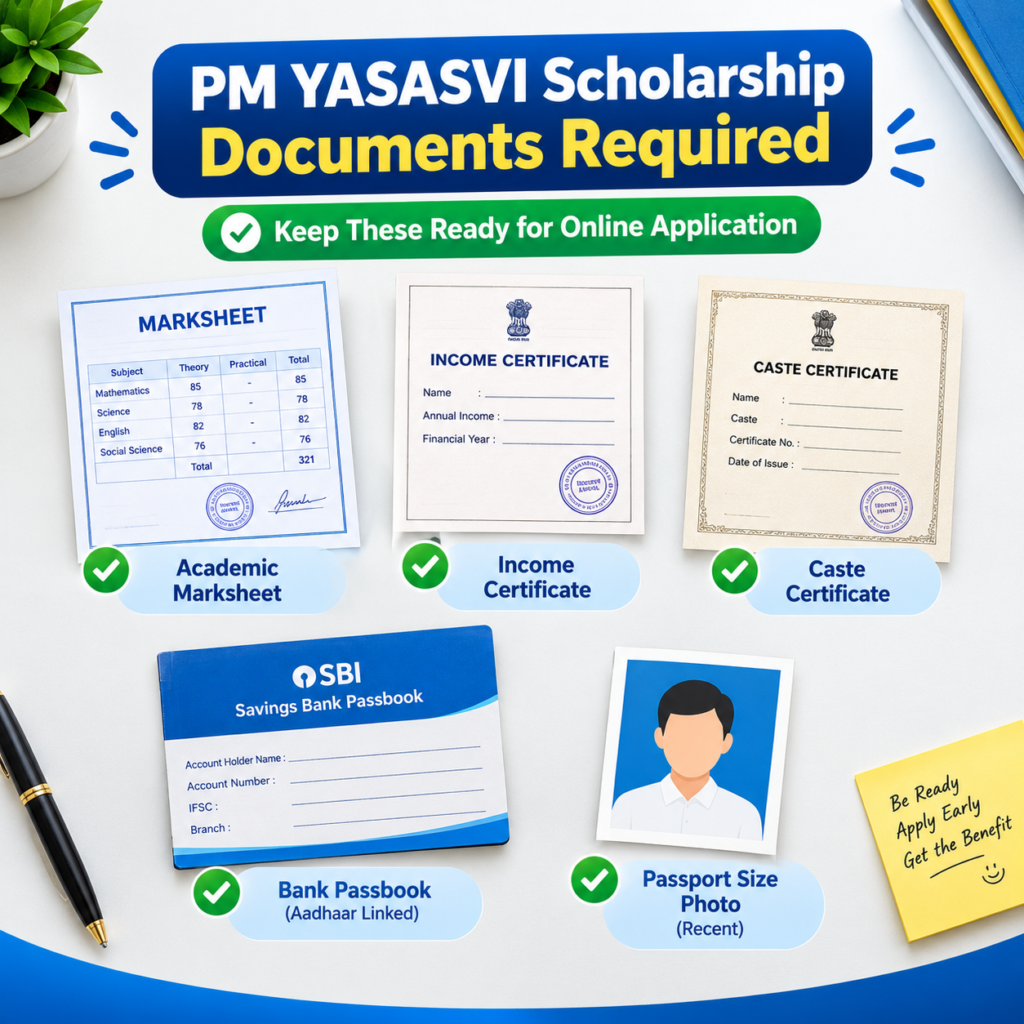
Most students lose time halfway through the form because one document is missing. Collect everything before you log in, scan each file clearly and keep them within NSP’s size and format limits.
Core documents
- Marksheet: Class 10 or Class 12 marksheet, or your latest exam result
- Income certificate: Issued by the competent authority, and it should be current
- Caste certificate: OBC, EBC or DNT as applicable
- Domicile certificate: Wherever your state requires it
- Passport-size photograph: Recent and clear
- Bank details: Passbook first page or account details, with Aadhaar seeding done
- Admission proof: Bonafide certificate, admission slip or fee receipt from your school or college
Details to keep ready
- Aadhaar number and the mobile number linked to it
- Active email ID
- Your school or college name and its code, if available
- Previous year’s marks and attendance, if asked
A few practical tips
Make sure the name on your documents matches your Aadhaar and bank records exactly. Even a small spelling difference can cause a mismatch during verification.
If your income certificate is old or your caste certificate is from another state, sort that out first. Applying with an incorrect or expired certificate is a common reason for rejection later.
How to Apply for PM YASASVI Scholarship Online (Step by Step)
If this is your first time on the portal, follow the order below. Skipping the OTR step is what stops most first-time applicants.
For the official portal, open the National Scholarship Portal and begin from there.
Step 1: Register on NSP (OTR)
Click “New Registration” or OTR on the home page. Enter your Aadhaar details and verify with the OTP sent to your Aadhaar-linked mobile number. Add your email and basic details. If you already have an OTR ID from a past year, skip this step and log in.
Step 2: Save your OTR ID and password
Once registered, you receive an OTR ID. Take a screenshot or write it down. Students often forget it and lose time on recovery later.
Step 3: Log in and start a fresh application
Use your OTR ID and password to log in. Click “Fresh Application” if this is your first time under this scholarship. Students who received the scholarship earlier should choose “Renewal”.
Step 4: Choose the right scheme
Select the PM YASASVI scheme that matches your class and level. Read the scheme name carefully. Picking a similar-looking scheme for the wrong class is one of the most frequent errors.
Step 5: Fill in the application form
Enter personal details, academic details, family income, institute information and bank account details. Match every entry with your documents. Double-check your bank account number and IFSC code.
Step 6: Upload documents
Upload each required document in the correct format and size. Check that the scans are readable. Blurry uploads are often marked defective.
Step 7: Preview and Final Submit
Review everything on the preview page. Then click Final Submit. A saved draft is not a submitted application, and unfinalised drafts can be auto-rejected on the last date.
Step 8: Download the printout
Save the acknowledgement or application printout in PDF and keep a printed copy. Your school may ask for it during verification.
Step-by-Step Process at a Glance
| Step | What to do | Quick tip |
|---|---|---|
| 1 | Open scholarships.gov.in and click New Registration (OTR) | Use your own mobile number |
| 2 | Enter Aadhaar details and verify with OTP | Keep your Aadhaar-linked phone with you |
| 3 | Note your OTR ID and password | Take a screenshot |
| 4 | Log in and click Fresh Application (or Renewal) | Pick the right option for your case |
| 5 | Select the PM YASASVI scheme for your class | Wrong scheme means rejection |
| 6 | Fill in personal, academic, income and bank details | Match every detail with your documents |
| 7 | Upload documents | Check size and clarity |
| 8 | Preview, then Final Submit | A draft is not an application |
| 9 | Download and save the printout | Share it with your school if asked |
Important Dates and What Happens After You Apply
Dates for 2026-27
Applications opened on June 1, 2026. School-level students have been reported to have an August 31 cutoff, and college-level students October 31. Some institutions have also published earlier internal dates, and other sites call these dates “expected” and subject to revision.
If the date for your level has passed, do not assume you are out. Check the NSP notice board and your state or institute notice for an extension or a re-opened window.
What happens after you submit
Submitting the form is only the first stage. Your application then moves through verification:
- Institute verification: Your school or college checks your details and documents. This usually continues for a few weeks after the student deadline.
- District or state-level verification: The nodal authority verifies the institute-approved applications.
- Approval and payment: Once approved, the amount is sent by DBT to your Aadhaar-linked bank account.
If your institute is slow, your application can sit idle even though you did everything right. That is why following up matters.
What you should do after applying
- Inform your class teacher or nodal officer that you have submitted
- Log in every few days to check the application status
- Keep your printout, OTR ID and bank details safe
- Respond quickly if the portal or your school asks for a correction
If you got the scholarship last year
You will usually need to renew instead of applying afresh. Our guide to the NSP Scholarship Renewal 2026-27: Last Date, Documents & Apply explains the renewal process step by step, so you do not apply under the wrong option.
For readers who prefer a quick walkthrough, this video explains the full process step by step.
Common Mistakes, Rejections and How to Fix Them
Most rejections come from small errors rather than a lack of eligibility. Here are the issues students report most often.
Wrong scheme or wrong class
Students select a similar scheme for the wrong level. Read the scheme name and class range before you continue, and ask your school if you are unsure.
Name or date of birth mismatch
If your name differs between your marksheet, Aadhaar and bank account, verification can fail. Fix the document that is wrong before applying.
Bank account not Aadhaar-seeded
Even if your application is approved, payment can fail if your account is not linked properly. Visit your bank and complete the linking early.
Pending at institute level
When an application is stuck, the usual cause is that the school has not verified it. Contact the nodal officer politely and share your application ID.
Poor document uploads
Blurry scans, wrong formats and oversized files are all common reasons for rejection. Rescan in good light and compress only if needed.
Problem vs Solution
| Problem | Why it happens | Solution |
|---|---|---|
| OTP not received | Mobile number not linked to Aadhaar | Update the number at an Aadhaar centre or use the linked one |
| Wrong scheme selected | Similar scheme names for different classes | Re-read the scheme details and apply under the correct one |
| Name mismatch | Different spellings across documents | Correct your documents before uploading |
| Payment failed | Bank account not Aadhaar-seeded | Visit your bank and complete seeding |
| Application “pending” | Institute has not verified it | Contact your nodal officer or institute |
| Document rejected | Blurry scan or wrong file size | Rescan clearly and keep files within the limit |
| Forgot OTR password | Credentials not saved | Use “Forgot Password” with your OTR ID |
| Draft not submitted | Final Submit not clicked | Complete and submit before the last date |
| Income certificate rejected | Old or incorrect certificate | Get a fresh certificate from the competent authority |
To get started, open the official National Scholarship Portal and keep your documents beside you.
If you received a scholarship last year, you will need to renew rather than apply afresh. Our guide to the NSP Scholarship Renewal 2026-27 covers the last date, documents and process
SP Scholarship Renewal 2026-27: last date, documents and how to apply
How do I apply for PM YASASVI Scholarship online?
To apply for PM YASASVI Scholarship 2026-27, register on scholarships.gov.in with a new OTR, log in, select the PM YASASVI scheme, fill in your academic and bank details, upload documents, submit, and download the final printout. Keep your Aadhaar-linked bank account ready.
FAQ
What is the last date to apply for PM YASASVI Scholarship 2026-27?
Reports give August 31, 2026 for school students and October 31, 2026 for college students, though some institutions list earlier dates. Confirm the date for your level on the NSP portal.
Can I apply for PM YASASVI offline?
No. Applications are accepted only through the National Scholarship Portal.
Do I need a new OTR if I already have an NSP account?
No. If you already have an OTR ID, log in with it and start a fresh or renewal application.
What is the family income limit?
For most PM YASASVI components it is ₹2.5 lakh per year. Check the guidelines for your specific scheme.
Is there an entrance test for PM YASASVI in 2026-27?
Reports for this cycle say the YASASVI Entrance Test is not being held. Verify this on the official portal.
How will I receive the scholarship money?
It is sent by Direct Benefit Transfer to your Aadhaar-linked bank account.
Conclusion
Applying for the PM YASASVI Scholarship is not complicated, but it punishes small mistakes and late action. Keep your documents ready, register carefully, double-check the scheme you choose, and never forget to download the final printout.
If your deadline is close, do not wait for the last day. Open the National Scholarship Portal, finish the form and follow up with your school. A completed application matters far more than a perfect one that never gets submitted.
And if anything feels unclear, ask your teacher, check the official notice or call the NSP helpline. A few minutes of checking now can protect a whole year of support.