NSP Scholarship 2026-27 Payment Status: Latest Update & PFMS Check
Introduction
Waiting for scholarship money is stressful. You apply, upload documents, follow up with your college, and then nothing seems to happen for weeks.
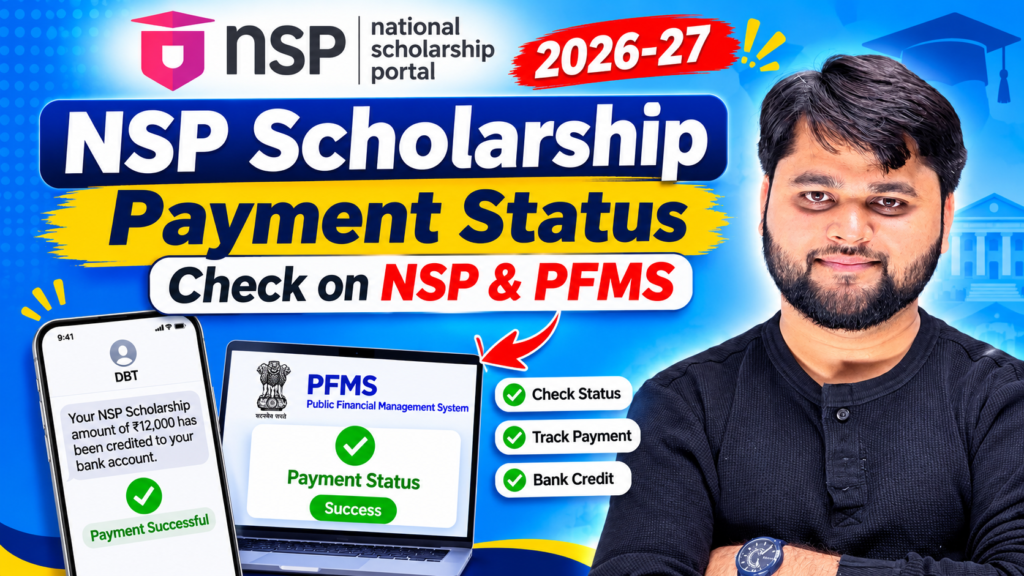
Here is the direct answer. To check your NSP Scholarship 2026-27 payment status, log in to the National Scholarship Portal with your Application ID and password to see which stage your form has reached. Then use the “Know Your Payment” option on the PFMS website to confirm whether the money has actually been sent to your bank account.
These are two different checks. NSP tells you where your application stands, while PFMS tells you whether a payment has been generated and credited.
In this guide you’ll learn:
- What each NSP status message really means
- How to check payment on NSP and PFMS, step by step
- Why payments get delayed and how to fix each cause
- What to do if your payment fails or goes to the wrong account
- How to avoid fake payment-update messages
If you only want the quick method, read the first two sections. If your payment is stuck, jump to Sections 4 and 5.

How Do You Check NSP Scholarship Payment Status in 2026-27?
Let’s start with the part that matters most. There are two places to look, and each one answers a different question.
Step one: the NSP portal. Open the official National Scholarship Portal, log in with your Application ID and password, and open your application status. This shows whether your institute has verified your form, whether the state or district nodal officer has approved it, and whether it has moved on for payment.
Step two: PFMS. NSP scholarships are paid as direct benefit transfers through the Public Financial Management System. Once your NSP status shows approval or payment initiation, PFMS lets you confirm whether the credit has actually been generated for your bank account.
So the order is simple. Check NSP first. If it says approved or sent for payment, check PFMS. If NSP still shows pending, PFMS will most likely show nothing, because no payment exists yet.
To check NSP scholarship payment status, log in to the National Scholarship Portal with your Application ID and review your application status. Then open PFMS, choose Know Your Payment, select your bank, enter your account number and captcha, and submit to see whether the payment was credited. (49 words)
Who should read this section closely?
This method applies to students under the central scholarship schemes handled through NSP, including pre-matric, post-matric, and merit-based categories, as well as renewal applicants. If you applied through a separate state portal, your first check will be on that portal instead.
A small note on accuracy: portals change button names, layouts, and menu positions from year to year. The steps here describe the general path. Always follow what the live website shows.
Quick Summary
| What you want to know | Where to check | What you need |
|---|---|---|
| Has my form been verified or approved? | NSP portal, application status | Application ID and password |
| Has money been sent to my bank? | PFMS, Know Your Payment | Bank name and account number |
| Which stage is my form stuck at? | NSP status page | Application ID |
| Which bank account is linked to my form? | NSP application form | Login details |
| Is there an official notice or update? | scholarships.gov.in notices section | Nothing, it’s public |
| Was my payment returned or failed? | PFMS plus your bank | Account number and passbook |
| Where do I complain about a delay? | Official grievance option on NSP | Application ID and screenshots |
What Do the NSP Payment Statuses Actually Mean?
The messages look similar, but they describe very different situations. Reading them correctly saves you a lot of anxiety.
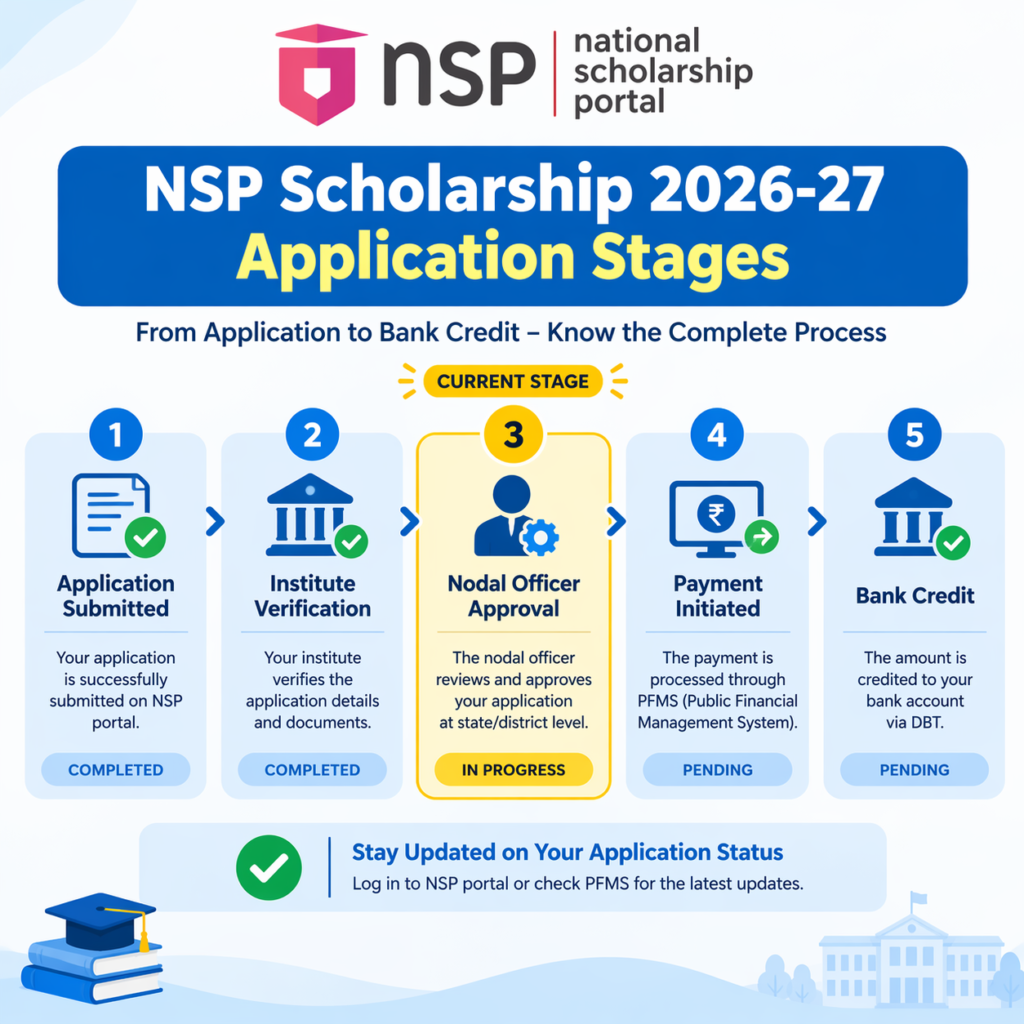
Pending at institute level. Your college, school, or institution has not verified your form yet. Nothing else moves until they do. This is the single most common reason students wait for a long time. The fix is usually a polite visit to the scholarship cell with your Application ID.
Verified by institute, pending at nodal officer. Your institute has done its part. Now the state or district nodal officer needs to approve it. Timelines vary a lot depending on the state and the number of applications waiting.
Approved or sanctioned. Your application has passed verification. This is good news, but it does not mean money has landed in your account. Many students stop checking here and assume payment is done. It isn’t, necessarily.
Sent for payment or payment initiated. The sanction has gone into the payment system. The credit normally follows within a few working days, though banks sometimes take longer to reflect it.
Payment credited. Money has been transferred to your linked account. Always cross-check with your passbook or banking app.
Rejected or defect marked. Something is wrong with the form, documents, or eligibility. Read the remark carefully. In many cases you can correct and resubmit, but only before the deadline shown for that stage.
The key idea to remember: approved is not the same as paid. Confirm the actual credit on PFMS or in your bank account.
How long should you wait?
There is no single timeline that applies to everyone. Payment depends on verification speed at your institute, approval at the state level, and fund release for your scheme. Instead of relying on rumours about “payment will come on this date”, watch the official portal’s notices.
If your status hasn’t changed for a long time and you’ve already followed up with your institute, move on to the troubleshooting steps in Section 5.
Applied through the Uttar Pradesh portal instead of NSP? Our UP Scholarship Status Check 2026-27 step-by-step guide explains that process separately.
How to Check PFMS Payment Status for NSP, Step by Step
PFMS is the platform that actually processes these payments, so its Know Your Payment page is the fastest way to confirm a credit.
What to keep ready
- The bank account number linked to your NSP application
- The name of the bank
- A device with a stable internet connection
- Your Application ID, in case you need to cross-check with NSP
Use the same account you entered in your application. A mismatch between the account on your form and the one you check is a very common cause of “no record found” confusion.
The process
Open the official PFMS website in your browser and look for the “Know Your Payment” option on the home page or in the main menu. Select your bank from the list, enter your account number carefully, complete the captcha, and submit. The page will show payment details if a transaction exists for that account.
Read the result slowly. Look at the payment status, the amount, and the date. If a payment was generated but you don’t see it in your account yet, give your bank some time and then check your passbook or app.
Step-by-Step Process
| Step | What to do | Helpful tip |
|---|---|---|
| 1 | Open the official PFMS website | Type the address yourself; don’t use links from forwarded messages |
| 2 | Find “Know Your Payment” | Check the home page menu or quick links |
| 3 | Select your bank | Pick the exact bank where your scholarship account is held |
| 4 | Enter your account number | Re-check every digit before you submit |
| 5 | Fill in the captcha | Refresh the captcha if it’s unclear |
| 6 | Submit and read the result | Note the status, amount, and date |
| 7 | Cross-check with your passbook or bank app | Banks may reflect the credit slightly later |
| 8 | Save a screenshot | It helps if you need to raise a grievance later |
What if PFMS shows no record?
Don’t panic. “No record” most often means payment hasn’t been generated yet, or the account number was typed incorrectly. Re-enter the details carefully, then check again after a few days. If your NSP status says payment was initiated long ago and PFMS still shows nothing, ask your institute or the helpdesk to verify the bank details on your application.
M. H2 Section 4: Why NSP Scholarship Payments Get Delayed
Delays feel random, but most of them come from a short list of predictable causes.
1. Verification backlog. Institutes and nodal officers process thousands of applications. Your form may simply be waiting its turn. This is the most common cause and the one you can influence most, by following up politely with your college.
2. Bank account problems. An inactive or dormant account, a wrong IFSC code, or a name that doesn’t match your records can cause a payment to fail or bounce back.
3. Aadhaar seeding and DBT readiness. Many direct benefit transfers need your bank account linked to your Aadhaar and enabled to receive such benefits. If the link is missing, the transfer can fail even when everything else is correct.
4. Document defects. Blurry certificates, outdated income proof, or mismatched details between documents can cause a form to be sent back. Check your status for any remark.
5. Fund release cycles. Sometimes a form is approved but payment waits for funds to be released for that scheme or state. In this case, nothing is wrong with your application. You’re just waiting in line.
6. Late or incomplete institute action. If your institute hasn’t completed its own process, your form can sit at the first stage for weeks without any visible problem.
7. Renewal errors. Renewal students sometimes forget to update details or re-verify, which can leave the application in limbo.
A short story that explains it
Think of your scholarship as a parcel moving through a courier chain. Your college is the first depot, the nodal officer is the second, and PFMS is the delivery van. If the parcel is sitting at the first depot, tracking the van will tell you nothing. That’s why checking NSP first, and PFMS second, saves you a lot of confusion.
For readers who prefer a quick walkthrough, this video explains the full process step by step.
What to Do If Your NSP Payment Is Stuck or Failed
Work from the simplest checks to the more formal ones.
1. Recheck your NSP status
Log in again and read the exact status and any remarks. Many students miss a small defect note that explains everything.
2. Talk to your institute
If your form is pending at the institute level, visit the scholarship cell or accounts office. Carry your Application ID, a printout or screenshot of the status, and a polite request to verify. A specific request works much better than a general question.
3. Verify your bank details
Check the account number, IFSC code, and account holder name on your application. If something is wrong, ask your institute or the helpdesk how to correct it while the window is open.
4. Visit your bank
Ask whether your account is active, linked to Aadhaar, and able to receive DBT credits. Request a printout of your recent transactions so you can see if a payment came in under a different description.
5. Raise a grievance
If everything looks right and the status has not changed for a long time, file a grievance through the official portal at scholarships.gov.in. Include your Application ID, scheme name, screenshots, and a short factual description of the problem.
6. Keep a paper trail
Save every acknowledgement number, email, and screenshot. A clear record speeds up resolution and protects you if the issue goes on for a while.
Tips to avoid problems next year
- Submit your form well before the last date.
- Double-check your bank details before final submission.
- Keep your mobile number and email active.
- Link your bank account to Aadhaar early.
- Save a copy of every document you upload.
- Follow up with your institute soon after submission.
Problem vs Solution
| Problem | Likely reason | What to do |
|---|---|---|
| Status stuck at “Pending at institute” | Institute hasn’t verified your form | Meet the scholarship cell with your Application ID |
| Status stuck at nodal officer | State-level approval queue | Wait, then follow up through the helpdesk or grievance option |
| Approved but no money | Payment not yet initiated or fund release pending | Check PFMS and your passbook after a few working days |
| PFMS shows no record | Payment not generated, or wrong account details | Re-enter details and check again later |
| Payment failed or returned | Wrong account, inactive account, or Aadhaar mismatch | Fix bank details and confirm Aadhaar linking with the bank |
| Application rejected | Document or eligibility defect | Read the remark, correct documents, resubmit if the window is open |
| Money credited to a different account | Old or wrong account on the form | Raise a grievance with proof and contact your bank |
| Status not updating for a long time | Backlog or system delay | Save screenshots and raise a grievance |
| Received a “payment update” on WhatsApp | Possible scam or misinformation | Verify only on the official portal; never share OTPs or passwords |
Always rely on notices posted on the official National Scholarship Portal rather than screenshots forwarded on social media.
Staying Safe from Fake Payment Updates
Every scholarship season, fake messages spread fast. Messages claiming “payment released today”, links asking you to “claim your scholarship”, or calls asking for your OTP are red flags.
Remember these rules:
- No official portal will ask you to share your OTP, PIN, or password over a call or chat.
- Never pay anyone to “speed up” your scholarship.
- Don’t trust screenshots that have no source.
- Open the official portal by typing the address yourself.
- When in doubt, ask your institute’s scholarship cell.
A few minutes of caution can save you from losing money and personal data.
FAQ
How do I check my NSP scholarship payment status for 2026-27?
Log in to NSP with your Application ID and password to see your application stage. Then use Know Your Payment on PFMS with your bank account number to confirm any credit.
Does “approved” on NSP mean the money has been paid?
No. Approved means your application has cleared verification. Payment follows as a separate step, so confirm it on PFMS or in your bank account.
How do I check PFMS payment status for NSP?
Open the official PFMS website, choose Know Your Payment, select your bank, enter your account number and captcha, and submit. The page shows payment details if a transaction exists.
Why does PFMS show no record for my account?
Usually the payment hasn’t been generated yet, or the account number was entered wrongly. Recheck the details and try again after a few days.
How long does NSP take to send the scholarship amount?
There’s no fixed timeline. It depends on verification at your institute and state, and on fund release. Follow official notices rather than rumours.
Can I check NSP payment status with only my mobile number?
Generally no. NSP status needs your Application ID and password, and PFMS needs your bank and account details.
What should I do if my payment failed?
Verify your account number, IFSC code, and Aadhaar linking with your bank. Then raise a grievance on the official portal with screenshots.
Conclusion
Waiting on scholarship money can feel endless, especially when fees, books, and travel costs are already due. But most delays have simple, fixable causes, and you can check nearly all of them yourself in a few minutes.
Start with NSP to see where your form stands. Move to PFMS to confirm the actual credit. Keep your Application ID, bank details, and screenshots safe. If something looks wrong, act early instead of waiting for the last date.
Above all, rely on the official portal for updates and ignore forwarded rumours. Your scholarship is your right, and a little patience, a polite follow-up, and a clear record usually get it moving.
If this guide helped you, share it with a classmate who’s also waiting on their payment.