
NSP Scholarship 2026-27 OTR Verification Failed? Complete Fix Guide
Introduction
If you are seeing the NSP Scholarship 2026-27 OTR Verification Failed error while registering on the National Scholarship Portal, don’t panic. This problem is common and is usually caused by Aadhaar verification issues, incorrect personal details, Face Authentication errors, or temporary server problems.
In this complete guide, you’ll learn why OTR verification fails, how to fix every possible error, how to complete your OTR successfully, and what to do if your verification is still pending. Whether you’re applying for a fresh scholarship or renewal, this article will help you complete your registration without confusion.
What Does OTR Verification Failed Mean in NSP Scholarship 2026-27?
OTR (One Time Registration) is the first step before applying for any scholarship on the National Scholarship Portal. During registration, the portal verifies your identity using Aadhaar, demographic details, and face authentication.
If verification fails, your registration cannot proceed until the issue is resolved.
The verification failure does not always mean your application has been rejected. In many cases, students can complete verification after correcting their details or trying again later.
Quick Summary
| Topic | Details |
|---|---|
| Issue | OTR Verification Failed |
| Portal | National Scholarship Portal |
| Common Reasons | Aadhaar mismatch, Face Authentication failure, Server issue |
| Can it be fixed? | Yes |
| Documents Needed | Aadhaar, Mobile linked with Aadhaar |
| Application Impact | Cannot complete scholarship registration |
| Best Solution | Correct details and verify again |
Top Reasons Why NSP OTR Verification Fails
Several reasons can trigger this error during registration.
1. Aadhaar Details Do Not Match
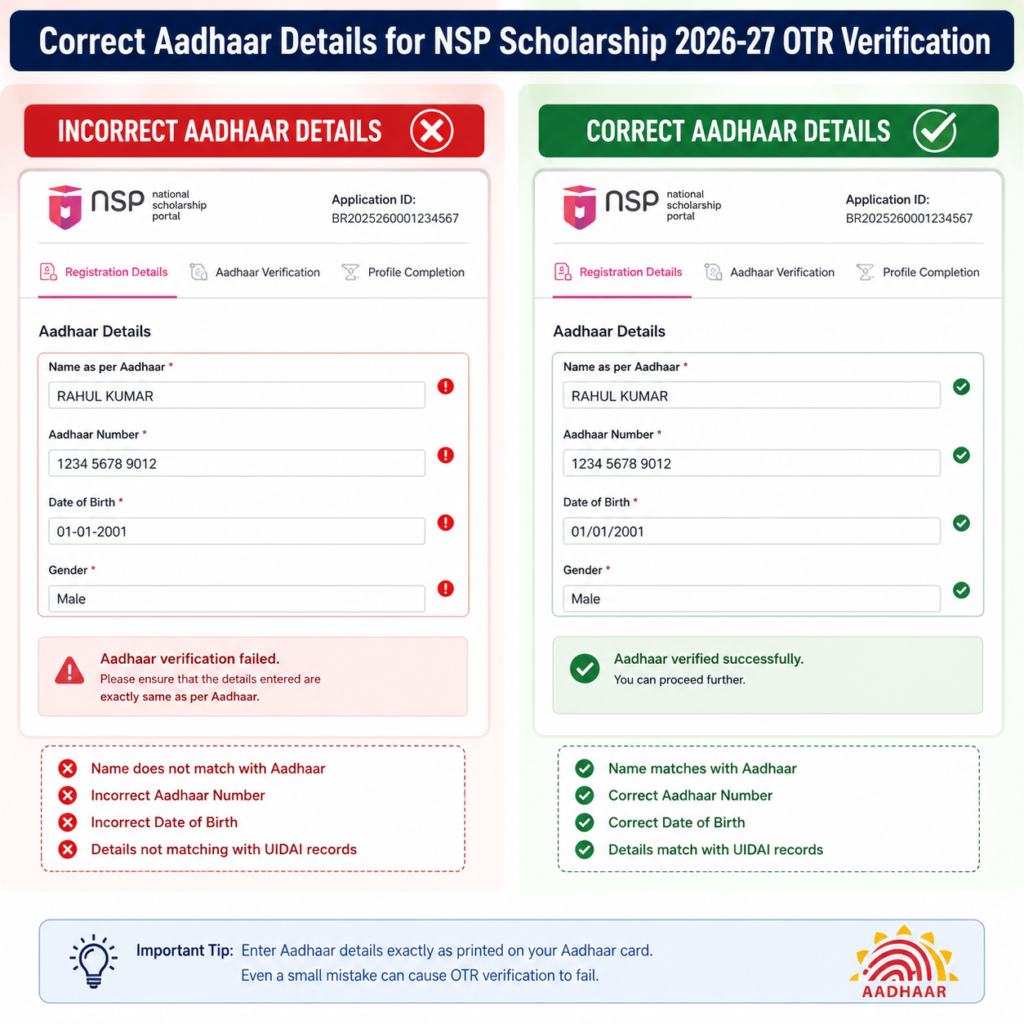
Your name, date of birth, or gender entered in NSP must exactly match the Aadhaar database.
2. Mobile Number Not Linked with Aadhaar
Many verification steps depend on OTP authentication. If your Aadhaar-linked mobile number is inactive, verification may fail.
3. Face Authentication Failed
Students using the Face Authentication process may experience failure due to:
- Poor lighting
- Blurred camera
- Wrong camera angle
- Unsupported mobile device
- Old application version
4. UIDAI Server Busy
Sometimes UIDAI servers experience high traffic. During these periods, verification requests may fail even when all details are correct.
5. Incorrect Aadhaar Number
Entering an incorrect Aadhaar number is one of the most common mistakes during OTR registration.
6. Technical Issues on NSP Portal
During peak registration periods, the portal may experience temporary technical problems.
Important Tips Before Applying for NSP Scholarship 2026-27
Before submitting your NSP Scholarship 2026-27 application, make sure you complete the following checks. These simple precautions can help you avoid OTR verification errors, application rejection, and unnecessary delays during the scholarship process.
1. Ensure Your Aadhaar is Active and Valid
Your Aadhaar number is the primary identity document used during OTR (One Time Registration). Before applying, verify that your Aadhaar is active and that there are no issues with your UIDAI records.
Things to check:
- Enter the correct 12-digit Aadhaar number.
- Ensure your Aadhaar has not been locked or deactivated.
- Verify that your name, date of birth, and gender are correct in the Aadhaar database.
- If any information is incorrect, update it through the UIDAI portal before starting your NSP registration.
2. Link Your Mobile Number with Aadhaar
Most verification processes on the NSP portal require OTP authentication. If your mobile number is not linked to Aadhaar or is inactive, you may not receive verification OTPs.
Before applying:
- Confirm that your current mobile number is linked with Aadhaar.
- Ensure the SIM card is active and can receive SMS messages.
- Keep your phone nearby during registration to avoid OTP timeouts.
3. Complete Face Authentication Successfully
Some students are required to complete Face Authentication during OTR registration. A failed authentication can stop the registration process.
For successful verification:
- Use a smartphone with a good-quality front camera.
- Ensure your face is clearly visible.
- Perform authentication in a well-lit environment.
- Remove sunglasses, masks, or anything covering your face.
- Hold the phone steady and follow the instructions displayed on the screen.
- Update the Face Authentication app to the latest version if required.
4. Verify That Your Personal Details Match Official Documents
One of the biggest reasons for OTR verification failure is a mismatch between the information entered on the portal and your official documents.
Double-check the following:
- Full name spelling
- Date of birth
- Gender
- Aadhaar number
- Category (if applicable)
Even a small spelling mistake or incorrect date can cause verification to fail.
5. Use a Stable Internet Connection
Interrupted internet connectivity can cause registration sessions to expire or prevent verification requests from reaching the server.
To avoid this:
- Use a reliable Wi-Fi or high-speed mobile network.
- Avoid switching between networks while completing the registration.
- Do not refresh the page during the verification process unless instructed.
6. Use an Updated Browser
Older browsers may not support all NSP portal features, leading to loading issues or verification errors.
Recommended browsers:
- Google Chrome (latest version)
- Microsoft Edge
- Mozilla Firefox
Also:
- Clear your browser cache before starting.
- Disable unnecessary browser extensions.
- If an error occurs, try using Incognito/Private mode.
7. Avoid Creating Multiple OTR Registrations
Every student should create only one OTR account using their Aadhaar number. Attempting multiple registrations can result in technical conflicts or account-related issues.
Best practices:
- Check whether you already have an OTR before registering again.
- Use the existing account for future scholarship applications.
- Recover your account if you have forgotten your login details instead of creating a new one.
8. Keep All Required Documents Ready
Preparing your documents in advance makes the application process faster and reduces the chance of mistakes.
Commonly required documents include:
- Aadhaar Card
- Recent passport-size photograph
- Educational mark sheets
- Income Certificate
- Caste Certificate (if applicable)
- Bank Passbook linked with Aadhaar
- Bonafide Certificate (if required by the scholarship)
Ensure that scanned copies are clear, readable, and within the file size limits specified on the NSP portal.
9. Save Screenshots of Every Important Step
Keeping screenshots can be very helpful if you encounter technical issues or need to contact the NSP Helpdesk.
Take screenshots of:
- OTR registration confirmation
- Successful Face Authentication
- Error messages
- Application ID
- Final submission page
These records can help you explain the issue quickly if support is required.
10. Apply Before the Last Date
Do not wait until the final day to submit your application. Heavy traffic on the portal during the last few days may cause slow loading, login failures, or verification delays.
Applying early gives you enough time to:
- Correct any mistakes.
- Upload missing documents.
- Resolve verification issues.
- Contact the NSP Helpdesk if necessary.
Step-by-Step Fix Process
| Step | Action |
|---|---|
| Step 1 | Check Aadhaar number carefully |
| Step 2 | Verify your Name, DOB and Gender match Aadhaar |
| Step 3 | Ensure Aadhaar mobile number is active |
| Step 4 | Complete Face Authentication again |
| Step 5 | Clear browser cache or use Incognito Mode |
| Step 6 | Try another browser like Chrome or Edge |
| Step 7 | Wait a few hours if UIDAI servers are busy |
| Step 8 | Login again and retry OTR verification |
If the issue still persists after following all steps, wait for a few hours and try again instead of repeatedly submitting requests.
For readers who prefer a quick walkthrough, this video explains the full process step by step.
Common OTR Verification Problems and Their Solutions
Students often face similar errors during registration. Understanding the exact cause helps resolve the issue faster.
Problem vs Solution
| Problem | Solution |
|---|---|
| Aadhaar mismatch | Correct details according to Aadhaar |
| OTP not received | Check Aadhaar-linked mobile number |
| Face Authentication failed | Retry in good lighting with clear camera |
| UIDAI server error | Wait and retry later |
| Browser issue | Clear cache or use another browser |
| Portal not loading | Try during non-peak hours |
| Session expired | Login again |
| Invalid Aadhaar | Enter correct Aadhaar number |
official National Scholarship Portal
NSP Scholarship 2026-27 Bank Account Not Verified? PFMS Fix Guide
How do I fix NSP Scholarship 2026-27 OTR Verification Failed?
If your NSP Scholarship 2026-27 OTR verification fails, verify that your Aadhaar details exactly match your registration details, ensure your Aadhaar-linked mobile number is active, complete face authentication correctly, and retry after some time if UIDAI or NSP servers are temporarily unavailable.
Frequently Asked Questions
What is OTR in NSP Scholarship 2026-27?
OTR stands for One Time Registration. It creates a unique registration ID that students use to apply for scholarships.
Why is my OTR verification failing?
The most common reasons include Aadhaar mismatch, OTP issues, face authentication failure, or temporary server problems.
Can I apply without OTR?
No. OTR registration is mandatory before submitting an NSP scholarship application.
How long does OTR verification take?
In most cases, verification is completed within a few minutes. Delays may occur during heavy server traffic or technical maintenance.
Can I edit my Aadhaar details after OTR verification fails?
Yes. If incorrect details were entered during registration, you can correct them before attempting verification again.
Will OTR verification failure reject my scholarship?
No. OTR verification failure only prevents registration. Once the issue is resolved and verification is successful, you can continue your scholarship application.
Conclusion
The NSP Scholarship 2026-27 OTR Verification Failed error is usually caused by Aadhaar verification mismatches, face authentication issues, inactive Aadhaar-linked mobile numbers, or temporary server delays. Fortunately, most students can resolve the problem by carefully checking their details, completing authentication correctly, and retrying after some time.
Before submitting your scholarship application, make sure your OTR registration is successfully completed, as it is the foundation for the entire application process. Following the steps in this guide can save time and help you avoid unnecessary delays.





One Response