
UP Scholarship 2026-27 Status Check Online: How to Track Your Application, Understand Every Status and Fix Delays
Introduction
If you want to do an UP scholarship status check 2026-27, here is the short answer. Visit scholarship.up.gov.in, open the Status menu, select the academic year, and enter your registration number and date of birth. The result shows exactly which desk your form is sitting at.
That takes two minutes. What takes longer is understanding what the message on the screen actually means. “Pending at Institute” and “Pending at District” sound similar, but they need very different actions from you. And “Defective” can quietly cost you a whole year of scholarship money if you ignore it.
This guide covers everything in one place: the exact steps, what you need before you start, what every status message means, how to fix common problems, and how the money reaches your bank account. If you have been searching for “up scholarship status 2026-27 kaise check kare”, the process is explained below in simple, plain language. It works on a phone as well as a laptop.

How to Check UP Scholarship Status 2026-27 Online
You can check your status only through the official portal. Nobody needs to charge you for this, and no agent is required.
Before you open the portal, keep these ready:
- Registration number: This was generated when you registered. It is usually in your SMS or on the printout of your form.
- Date of birth: Enter it exactly as it appears in your application.
- Password: Needed only if you want to log in to your candidate dashboard instead of using the quick status page.
- Academic year: Select 2026-27 for the current cycle. Older years appear in the same list, so be careful not to pick the wrong one.
Your registration number and birth date are enough to track your form. If you cannot find your registration number, ask your school or college scholarship desk. They can search it using your name and class or course.
One more thing worth knowing: the portal has several categories, namely Pre-Matric, Post-Matric (Intermediate) and Dashmottar. These are covered for the 2026-27 session. The status steps are the same for all of them, but the dates and the verification stages differ. That is why two classmates can see different messages on the same day.
How do I check UP scholarship status 2026-27?
Visit scholarship.up.gov.in, click Status, select Application Status, choose the academic year 2026-27, enter your registration number and date of birth, then submit. The page shows whether your form is pending at the institute, forwarded, pending at the district, defective, or approved. (47 words)
Quick Summary
| Detail | Information |
|---|---|
| Official website | scholarship.up.gov.in |
| Academic session | 2026-27 |
| Applies to | Pre-Matric, Post-Matric (Intermediate) and Dashmottar students |
| Details needed | Registration number + date of birth |
| Menu path | Status → Application Status / Check Current Status |
| Cost | Free |
| Works on mobile | Yes |
| Payment mode | DBT to an Aadhaar-seeded bank account |
| Best time to check | Every 2–3 days while verification is running |
| Keep as proof | Screenshot of status page |
Why Checking Your Status Regularly Matters Right Now
Many students apply, print the form, submit it to the college, and never look at the portal again. That is the most common reason scholarships get delayed or rejected.
Timing matters this month in particular. District verification for the 2026-27 cycle began on October 16 and runs until November 5. During this window, a form with a problem can be returned to you as defective. If you are not watching, the correction window can close without you knowing.
Think of the process as a relay race. The student runs the first leg by applying. The institute runs the second by verifying. The district runs the third. If the baton drops anywhere, the race does not end loudly; it just stalls silently. Checking your status is how you notice where it stalled.
Dates are not the same for everyone. For example, fresh Dashmottar applications were listed with a deadline of October 31, 2026, while renewals and other categories follow their own schedules. Always confirm your own category’s dates on the portal notice section before relying on any article, including this one. If you are still unsure about application dates, the paragraph under “Internal Link Placement” below will point readers to your last-date article.
A good habit: check on Monday and Thursday during verification, and take a screenshot each time. If something goes wrong later, you will have a dated record to show your institute.
Step-by-Step Process: UP Scholarship Status Kaise Check Kare 2026-27
If you are doing this for the first time, follow the steps slowly. Most “record not found” errors come from rushing at the date-of-birth or year fields.
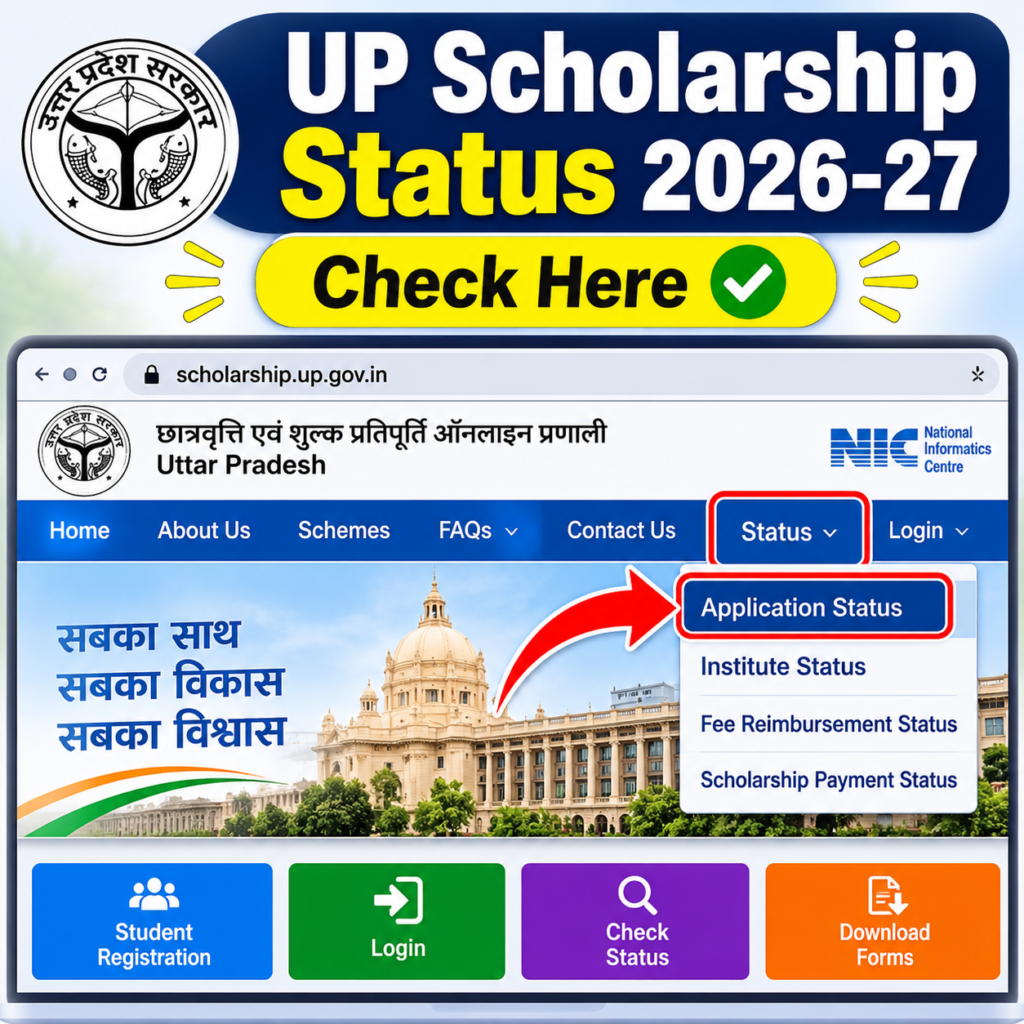
Step 1: Open the official portal. Type scholarship.up.gov.in in your browser’s address bar. Do not click links from random messages or social media posts, because fake scholarship sites exist.
Step 2: Click the Status option. It appears in the main menu on the home page. On mobile, you may need to tap the menu icon first.
Step 3: Choose Application Status. Some versions of the page label this “Check Current Status.” Both lead to the same result.
Step 4: Select the academic year. Pick 2026-27. If you applied last year and are checking an older form, choose that year instead.
Step 5: Enter registration number and date of birth. Double-check each digit. One wrong digit gives you a blank result, which can feel like your application is missing when it is not.
Step 6: Enter the captcha and submit. If the captcha is unclear, refresh it and try again.
Step 7: Read the status and the remarks. Do not stop at the headline word. The remarks line often tells you exactly what the problem is.
Step-by-Step Process
| Step | Action | Helpful tip |
|---|---|---|
| 1 | Open scholarship.up.gov.in | Type the address yourself |
| 2 | Click the Status tab | Use the menu icon on mobile |
| 3 | Select Application Status | May be labelled Check Current Status |
| 4 | Choose academic year 2026-27 | Do not pick an older year by mistake |
| 5 | Enter registration number and DOB | Match the format used in your form |
| 6 | Enter captcha, click Submit | Refresh captcha if unreadable |
| 7 | Read status and remarks | Take a screenshot |
| 8 | Note the next action | Institute, district or correction? |
For readers who prefer a quick walkthrough, this video explains the full process step by step
What Each UP Scholarship Status Means
Understanding the label is half the battle. Four labels appear most often in the portal: Pending at Institute, Forwarded, Pending at District, and Defective.
Pending at Institute. Your school or college has not verified your form yet. This is the most common stage and the most fixable one. Visit the scholarship in-charge, ask whether your form has been opened, and request a date.
Forwarded. The institute has checked your documents and passed the form on. This is a good sign. Your part is done unless something comes back.
Pending at District. The district Social Welfare office is reviewing the form. There is nothing to submit. Keep checking every few days.
Defective. Something does not match: a document, a detail, a name spelling. Read the remarks, correct the issue through your institute, and resubmit inside the window. Never leave a defective form alone.
Approved / Payment stage. Verification is complete and the amount is being processed for DBT payment to your bank account.
Rejected. The form did not qualify. The remark will usually explain why. Talk to your institute right away about whether any appeal or correction route exists in your case.
If your status does not change for more than a week during an active verification period, do not wait. Ask your institute to check the form from their login.
Status Not Updating? Common Problems and Easy Fixes
Most problems have ordinary causes. Delays usually trace back to Aadhaar seeding or verification objections rather than the portal itself. That is useful to know, because both are things you can fix.
Aadhaar and bank seeding. The scholarship is paid by DBT. Your bank account must be linked with Aadhaar for the transfer to work. Visit your bank and ask whether your account is Aadhaar-seeded and DBT-enabled. A passbook photocopy is not proof of seeding.
Name and date of birth mismatch. If your name is spelled one way on Aadhaar, another in the bank and a third in school records, the form can get flagged. Small differences like a missing middle name matter more than students expect.
Missing documents. Caste, income or attendance documents can be flagged during review. Verification reports confirm whether institute verification, attendance percentage and caste documents are cleared.
Institute delay. Sometimes the form simply sits in the college login. A polite, repeated visit works better than a single message.
Wrong year selected. Many “no record” errors are just the wrong academic year in the dropdown.
Portal slowness. Heavy traffic near deadlines slows the site. Try early morning or late night.
Problem vs Solution
| Problem | Likely reason | Solution |
|---|---|---|
| “Record not found” | Wrong year, registration number or DOB | Recheck all three and try again |
| Stuck at Pending at Institute | College has not verified the form | Visit the scholarship desk and ask for a date |
| Status shows Defective | Document or detail mismatch | Read remarks, correct through institute, resubmit in time |
| Approved but no money | Aadhaar not seeded with bank | Ask the bank to link Aadhaar for DBT |
| Name mismatch warning | Spelling differs across records | Correct the record that is wrong, then update the form |
| Forgot registration number | Not saved after applying | Check SMS or printout; ask the institute |
| Portal not opening | Heavy traffic | Retry at off-peak hours |
| Status unchanged for 10+ days | Form idle at one desk | Ask the institute or district office to check |
You can check your status only through the official portal.
official UP scholarship portal
Not every student receives only the state scholarship. Some also qualify for central schemes, and their application process is different from UP’s. If you belong to an OBC, EBC or DNT category, you can read our guide on the PM YASASVI Scholarship 2026-27 apply online: steps and dates to see whether you are eligible to apply for it as well.
PM YASASVI Scholarship 2026-27 Apply Online: Steps & Dates
FAQ
How can I check my UP scholarship status 2026-27 online?
Open scholarship.up.gov.in, click Status, select Application Status, choose 2026-27, and enter your registration number and date of birth.
Can I check UP scholarship status without a registration number?
Not directly. Look for the number in your SMS or form printout, or ask your institute’s scholarship desk to find it from their login.
What does “Pending at Institute” mean?
Your school or college has not verified your form yet. Ask the scholarship in-charge to open and forward it.
What does “Pending at District” mean?
The institute has verified it, and the district Social Welfare office is now reviewing it. You do not need to resubmit anything.
Why is my UP scholarship status showing Defective?
A detail or document did not match during verification. Read the remarks, fix the issue and resubmit within the correction window.
When will UP scholarship money come into my account?
Does my bank account need to be linked with Aadhaar?
Yes. Payment goes through DBT, so an Aadhaar-seeded account is important to avoid failed payments.
Conclusion
Checking your UP scholarship status takes about two minutes, but doing it regularly can protect your whole scholarship. With district verification running until early November, now is the right time to open the portal, read your status carefully, and fix anything marked Defective before the window closes.
Keep your registration number safe. Make sure your Aadhaar, bank account and school records match. Take a screenshot every time you check, and speak to your institute early rather than late. Most delayed scholarships are not lost scholarships. They are just forms that nobody noticed were stuck.
If this guide helped, share it with a friend who has not looked at their status yet. They may need it more than you think.