National CSS Scholarship Portal 2026-27 Apply Online | NSP Scholarship 2026-27 Apply Online Kaise Kare
Introduction
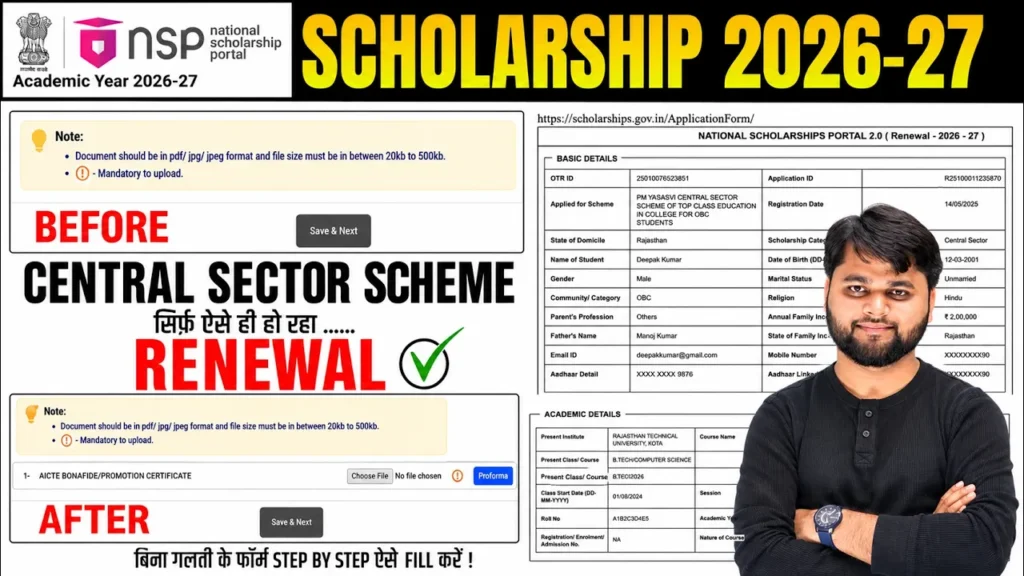
If you are planning to complete the National CSS Scholarship Portal 2026-27 Apply Online process, this guide will help you avoid common mistakes that can lead to application rejection. Many students are facing issues while applying or renewing their NSP Scholarship 2026-27, especially when uploading documents, updating academic details, or completing the final submission.
In this detailed guide, you’ll learn NSP Scholarship 2026-27 Apply Online Kaise Kare, how to complete renewal successfully, which documents are required, how to fix common NSP portal glitches, and what to do if your application gets stuck during verification. Whether you are applying from a laptop or mobile, this article covers everything in simple language.
National CSS Scholarship Portal 2026-27 Apply Online – Complete Overview
The National Scholarship Portal (NSP) is the Government of India’s centralized platform for scholarship applications. Students can apply for Fresh Scholarships as well as Renewal applications through a single portal.
For the Central Sector Scheme (CSS Scholarship), students must ensure that every detail entered in the application matches their academic records. Even a small mismatch in admission details, enrollment number, or uploaded documents may result in delays or rejection.
Many applicants have recently reported that the Document Upload option does not appear immediately after login. Fortunately, this is generally caused by a portal workflow issue rather than an eligibility problem. Updating and resubmitting the basic application details usually enables the document upload section.
This guide explains the safest process to complete your application while avoiding these common portal glitches.
National CSS Scholarship 2026-27 Quick Summary
| Particular | Details |
|---|---|
| Scholarship Name | Central Sector Scheme (CSS Scholarship) |
| Portal | National Scholarship Portal (NSP) |
| Academic Session | 2026-27 |
| Application Type | Fresh & Renewal |
| Eligible Students | College and University Students |
| Application Mode | Online |
| Required Documents | Marksheet, Aadhaar, Institute Details, Bank Account, Admission Details |
| Verification | Institute → State → Central |
| Final Status | Application Under Process for Verification |
NSP Scholarship 2026-27 Apply Kaise Kare (Step-by-Step)
Whether you’re applying for a fresh scholarship or completing a renewal, follow these steps carefully.
Step 1: Login to NSP Portal
Visit the official National Scholarship Portal and log in using your Application ID and Password.
Step 2: Select Your Scholarship
Choose the appropriate scholarship scheme.
For CSS Scholarship students, select:
Central Sector Scheme for College and University Students (CSS)
Step 3: Open My Application
Navigate to
My Application → Proceed
Step 4: Click Renew/Edit Application
Now click
Renew/Edit Application
Do not worry if the document upload section is missing at this stage.
Step 5: Update Basic Details
Open:
- Basic Information
- General Information
- Academic Information
- Application Specific Details
- Undertaking
Even if everything is already filled, review each section carefully.
Update missing details like:
- Admission Year
- Enrollment Number
- Registration Number
- Course Details
- Institute Information
Click Save & Next after each section.
Step 6: Submit Basic Information Again
After reviewing all details:
- Click Continue
- Accept Declaration
- Submit Updated Basic Details
This step is important because it refreshes your application and often resolves the missing document upload issue.
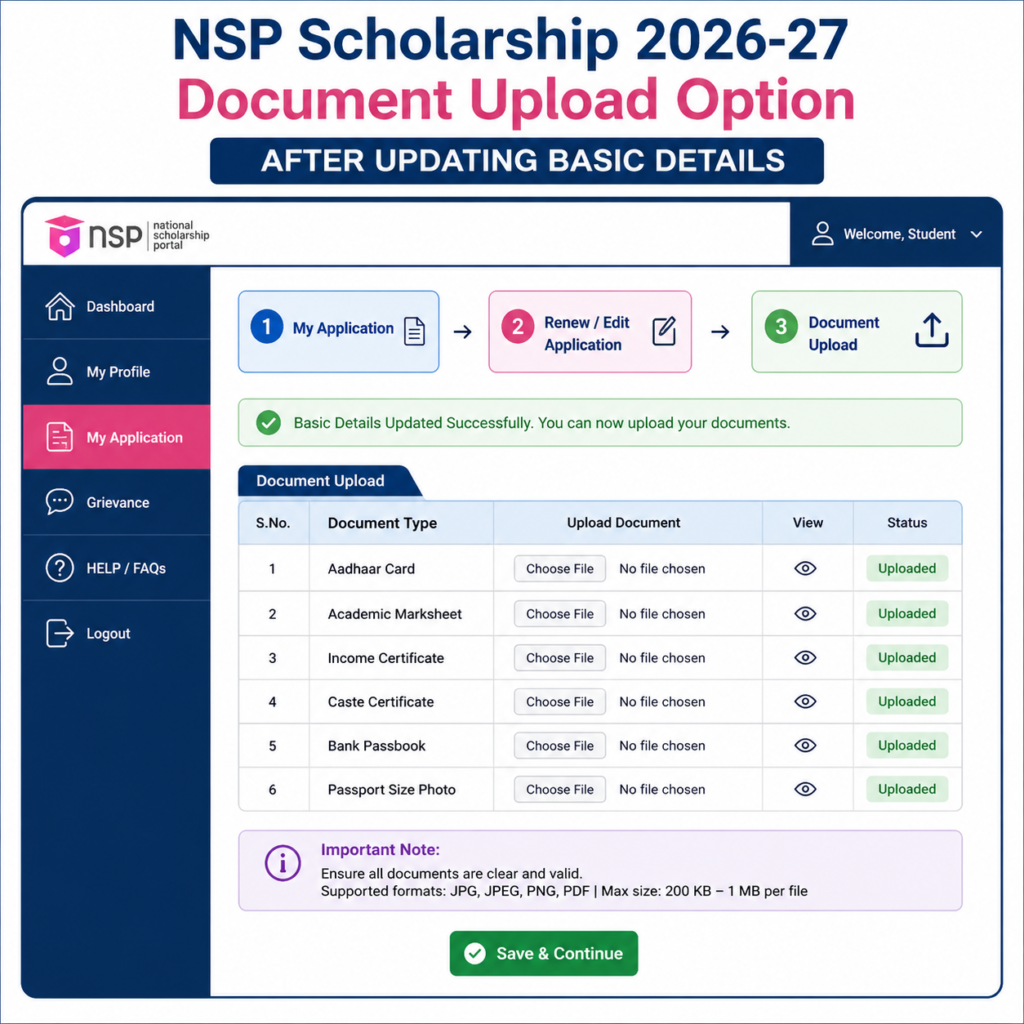
Why Document Upload Option Does Not Appear?
One of the most common issues students face during the NSP Scholarship 2026-27 renewal process is that the Document Upload section is missing immediately after opening the renewal form.
In most cases, this is not because your application is rejected or incomplete. Instead, it happens due to a temporary portal workflow issue.
To resolve this:
- Open My Application.
- Visit Basic Information.
- Review every section.
- Click Save & Next without skipping any page.
- Submit the updated basic details.
- Return to Renew/Edit Application.
After following these steps, the document upload option generally becomes visible, allowing you to upload the required marksheet and complete your application.
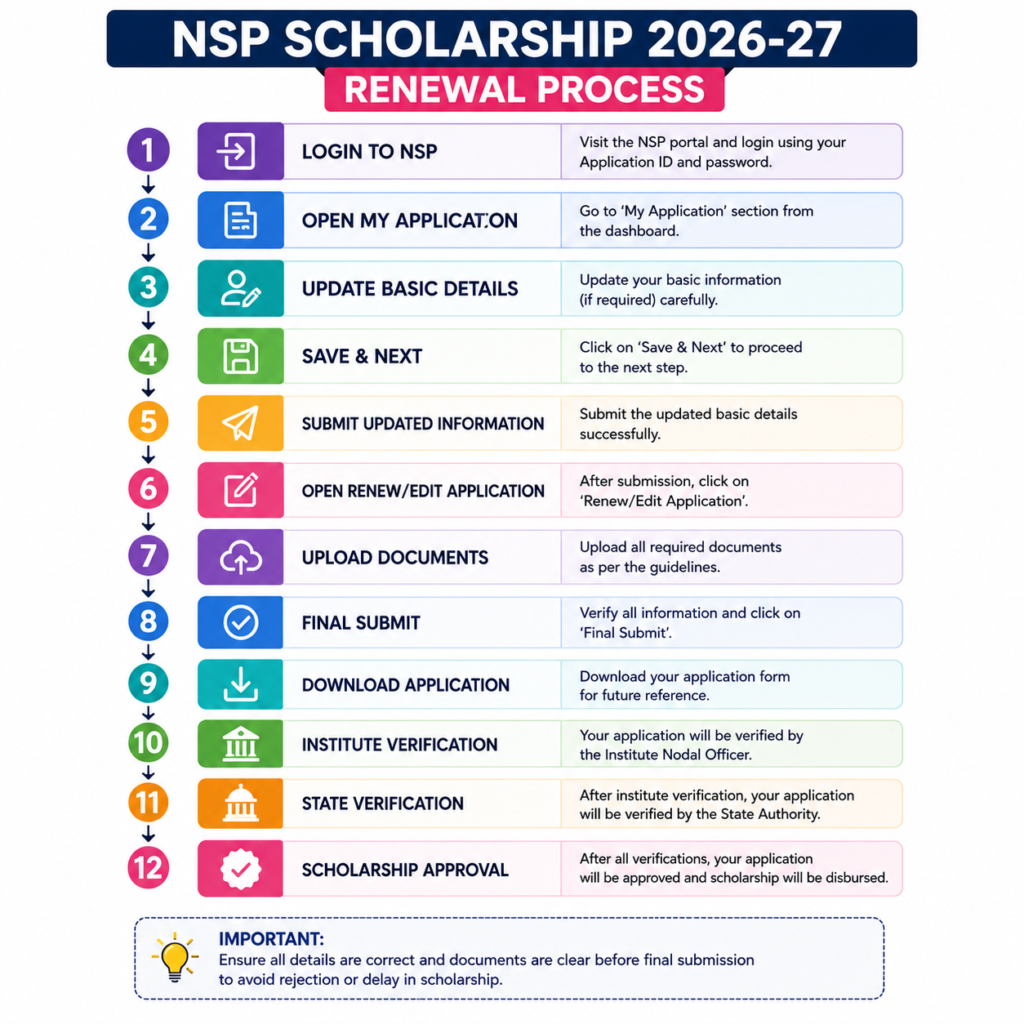
Table 2: NSP Scholarship Renewal Process
| Step | Action |
| 1 | Login to NSP Portal |
| 2 | Open My Application |
| 3 | Click Proceed |
| 4 | Select Renew/Edit Application |
| 5 | Update Basic Information |
| 6 | Verify Academic Details |
| 7 | Save & Next |
| 8 | Submit Basic Details |
| 9 | Reopen Renewal Form |
| 10 | Upload Required Documents |
| 11 | Final Submit |
| 12 | Download Application PDF |
How to apply for NSP Scholarship 2026-27?
To apply for NSP Scholarship 2026-27, log in to the National Scholarship Portal, update your basic and academic details, save each section, submit the updated application, reopen the renewal form, upload the required documents, and complete the final submission after verifying all information.
Common NSP Scholarship 2026-27 Problems & Their Solutions
While completing the National CSS Scholarship Portal 2026-27 Apply Online process, many students encounter technical issues that prevent them from submitting their applications successfully. Most of these problems are temporary and can be resolved by following the correct procedure instead of withdrawing the application.
Below are the most common issues reported by students and their practical solutions.
Problem 1: Document Upload Option Not Showing
This is currently one of the most common issues during the renewal process.
Solution
- Login to your NSP account.
- Open My Application.
- Go through Basic Information, Academic Details, and Application Specific Details.
- Click Save & Next on every page.
- Submit the updated basic details.
- Return to Renew/Edit Application.
In most cases, the document upload section becomes available after this process.
Problem 2: Academic Details Missing
Some students notice that important fields like Admission Year, Enrollment Number, or Registration Number are blank.
Solution
Before final submission:
- Verify all academic details.
- Fill every mandatory field carefully.
- Ensure the information matches your college records.
Even a small mismatch can delay institute verification.
Problem 3: Application Status Not Changing
After final submission, some students still see Submitted instead of Application Under Process.
Solution
Wait for a short time and refresh your dashboard. Once your institute starts verification, the status usually changes to:
Application Under Process for Verification at Institute Level
Problem 4: Wrong Document Uploaded
Uploading an incorrect marksheet or document is a common mistake.
Solution
Do not withdraw the application immediately.
Instead:
- Contact your Institute Nodal Officer.
- Request them to mark your application as Defective.
- Once the application is returned, you can upload the correct document and resubmit it.
This is much safer than withdrawing the application.
Common Problems vs Solutions
| Problem | Possible Reason | Recommended Solution |
|---|---|---|
| Document upload not visible | Portal workflow glitch | Update basic details and reopen renewal form |
| Academic details missing | Incomplete profile | Fill all mandatory fields before submission |
| Final status not updating | Verification pending | Wait for institute verification |
| Wrong document uploaded | User mistake | Ask Institute Nodal Officer to defect the application |
| Unable to edit application | Final submission completed | Request institute to return the application |
| Application rejected | Incorrect information | Correct details and re-submit after defect |
Important Tips Before Final Submission
Before clicking the Final Submit button, verify every detail carefully.
✔ Check Personal Information
- Name
- Aadhaar Number
- Date of Birth
- Mobile Number
- Email Address
✔ Check Academic Information
- College Name
- University
- Course
- Admission Year
- Roll Number
- Registration Number
- Enrollment Number
✔ Check Bank Details
Scholarship payments are transferred directly to your bank account.
Ensure that:
- Account Number is correct.
- IFSC Code matches your branch.
- Bank account is active.
- The account belongs to the applicant.
✔ Verify Uploaded Documents
Before submission, ensure that:
- Documents are clear.
- PDF or image quality is readable.
- File size is within NSP limits.
- Correct marksheet has been uploaded.
- No pages are missing.
For readers who prefer a quick walkthrough, this video explains the full process step by step.
Apply on National Scholarship Portal
NSP CSS Scholarship 2026-27 Apply Online & Renewal Guide
FAQs
How to apply for NSP Scholarship 2026-27 online?
To apply for the NSP Scholarship 2026-27, visit the National Scholarship Portal, log in with your credentials, complete your profile, fill in the application form, upload the required documents, verify all details, and submit the application before the deadline.
How can I renew my National CSS Scholarship for 2026-27?
Log in to the NSP portal, select Renew Application, verify your academic and personal details, update any required information, upload the latest marksheet (if required), and complete the final submission.
Why is the document upload option not appearing on the NSP portal?
This issue is usually caused by a portal workflow glitch. Update your Basic Information, Academic Information, and Application Specific Details again, click Save & Next, submit the updated information, and reopen the renewal application. In most cases, the upload option becomes visible.
Can I apply for the NSP Scholarship 2026-27 using my mobile phone?
Yes. The entire application process can be completed using a smartphone with a stable internet connection. However, using a laptop or desktop is recommended for easier document uploads and reviewing the application.
What should I do if I uploaded the wrong document?
Do not withdraw your application. Instead, contact your Institute Nodal Officer and request them to mark your application as Defective. Once it is returned to you, upload the correct document and submit it again.
Can I edit my NSP application after final submission?
Once the application is finally submitted, editing is generally not allowed. If corrections are needed, request your Institute Nodal Officer to return the application for correction instead of withdrawing it.
Conclusion
Completing the National CSS Scholarship Portal 2026-27 Apply Online process is straightforward when you follow the correct sequence of steps. Many students face issues such as missing document upload options, incomplete academic details, or confusion during renewal. Fortunately, most of these problems can be resolved by updating the application correctly instead of withdrawing it.
Before submitting your application, review every detail carefully, upload clear documents, and keep a copy of the final application form. If any correction is required after submission, contact your Institute Nodal Officer rather than withdrawing your application.
We hope this guide has helped you understand NSP Scholarship 2026-27 Apply Online Kaise Kare, complete the renewal process, and avoid common mistakes. If you still have questions, feel free to leave a comment below, and we’ll do our best to help.